
Although I didn't really need to, I felt like putting together a second submission with some of the "rejects" from LineCurveTexture, and so The Other Things was born. I didn't compromise on selecting for editting - these are the images that I would select otherwise but that didn't fit in any way into the original project.
I was also trying to get a background transparency to work with pdf 1.4 but to no avail. The intention was that the background frame would disappear when viewing so that the images would be nicely centred on the screen with a natural border.
I'm pretty sure this should be possible, as per pdf sepcs, but can't for the life of me figure out how to get it to work properly. I think it's maybe a viewer issue (yet I use Adobe's reader) and no amount of settings adjustments seem to work.
Wednesday, 7 July 2010
SoFoBoMo 2010: and another one

Thursday, 1 July 2010
SoFoBoMo 2010: done

I've finally completed my first submission for the year. Find it here.
Some points worth noting about my experience in doing the layout:
I was limited to an all electronic process, not having commissioned a printer since moving house (fully 6 months ago). I normally print the pages on small paper swatches and rearrange the on the floor/table.
This led to problems. Because of the multiple image sizes, I had a 2-dimensional problem as i looked to balance subject and image size across the whole book. equal sized thumbnails are not suited to this. The other major headache is the number of images: about 100. This makes it hard to keep track of them all while scrolling back and forth on the screen.
As a result, the actual layout of the spreads took about twice as long as it should.
I've also realised that the multiple page size idea is better suited to larger page sizes. here it works OK, and I could get a way with a few less than perfect pictures due to the smaller sizes. For a printed version, I think I'd want twice the page size.
Page size is also an interesting challenge. having both portrait and landscape orientation actually makes it trickier to select a page size. Life would be so much easier if I'd picked all the large images in one orientation and all the small ones in the other. Then I could pick a larger size but rectangular page.
I also surprised myself about double-truck (spread across the page fold). With the right subject and composition i think is can work quite well, as it does here. But that's just my opinion.
Please feel free to leave comments on what you think.
Saturday, 19 June 2010
SoFoBoMo 2010: the editing process
 Manila, June 2010
One of the SoFoBoMo 2010 rejects
As a progress report, I thought it might be useful to some to go through the edit ting process I've been using. I don't do bulk edits in this way very often and so SoFoBoMo is also an opportunity for me to hone my skills in that area, too. here is the step-by-step:
1. Having imported all the photos and catalogued as normal (I had 527 frames taken), I make first cut selections. I'm using Lightroom exclusively for processing and editing as it's a quick and easy one stop shop for the whole workflow. First cut is a fast process - anything that seems like it fits the theme and appears properly composed, exposed and in focus. 226 picked, took about 15 minutes.
2. Work on the first few to develop the visual look, exposure, toning, contrast etc. That takes a few minutes per photo, maybe I spent an hour sorting that out. The key parts of the development got turned into Lightroom presets, especially the toning, which speeds up the rest of the work.
3. Work through the first-cut to pick the ones to edit. Again, pretty fast and I develop a lot, rather than waste time mulling over selection. With the presets developed I spend only a couple of minutes on most photos. A few have local adjustments which take a bit longer but I doubt I spent more than 10 minutes on any one frame. As this is about a fast turn-around, I want good not perfect works of art. And consistency is more important to me than a few individual highlights. 102 edited.
4. I developed a Smart Collection to gather up the edits as they were completed, I'll use the collection for the final sorting and selection. I'm not into the book layout proper yet but I have a few distinct page forms in mind: double-truck, full bleed, single page, multiple per page. The 102 will get ratings based on likely page type and sorted into order of pages in the collection. I may or may not use them all.
5. From there, It'll be new export presets to turn the edits into the final images for the book. Part of that preset will be automated numbering and filing so they're all in order in a separate folder on my computer. Having them sorted that way speeds up entry into the book layout.
Even though I've been working on editing all week, I've actually spent very little time each day. 100 at, say, three minutes each is only 5 hours of work to get to the final cut plus the original hour to get the visual look right, meaning about an hour a night this week.
Tuesday, 15 June 2010
SoFoBoMo 2010: contacts part 4
These are the last (I hope) of the frames from this year's shooting. I've also processed most of the previous frames, so I already have 60 first-cut selections. Overall, this is probably the most I've had for a single SoFoBoMo book and will give me plenty of flexibility for the final product.


Sunday, 13 June 2010
SoFoBoMo 2010: contacts part 3
The contacts from today's photography from around the house. My plans for going out this afternoon were rudely interrupted by a thunderstorm.

The work on my book for this year is progressing well. One more trip out for some more photographs should give me plenty to select some good shots and I've got about 3 weeks to work on the layout.
Thursday, 10 June 2010
No frame left behind
 Manila, June 2010
As I was sorting through the weekend's pictures for selections to include in the SoFoBoMo project, I realised that i was editing out a lot that were actually quite good. Mainly they are being rejected as colour images in a black and white project. However, there are enough that I could put together an entirely separate submission, with an entirely different look and feel. So that is what I'm going to do - shoot for the main project but pick up appropriate rejects for something different.
Maybe it will lead me to some insights about the things unseen when I'm out taking pictures. While the rejects were shot with one thing in mind, they're turning out to be something quite different after the fact.
Monday, 7 June 2010


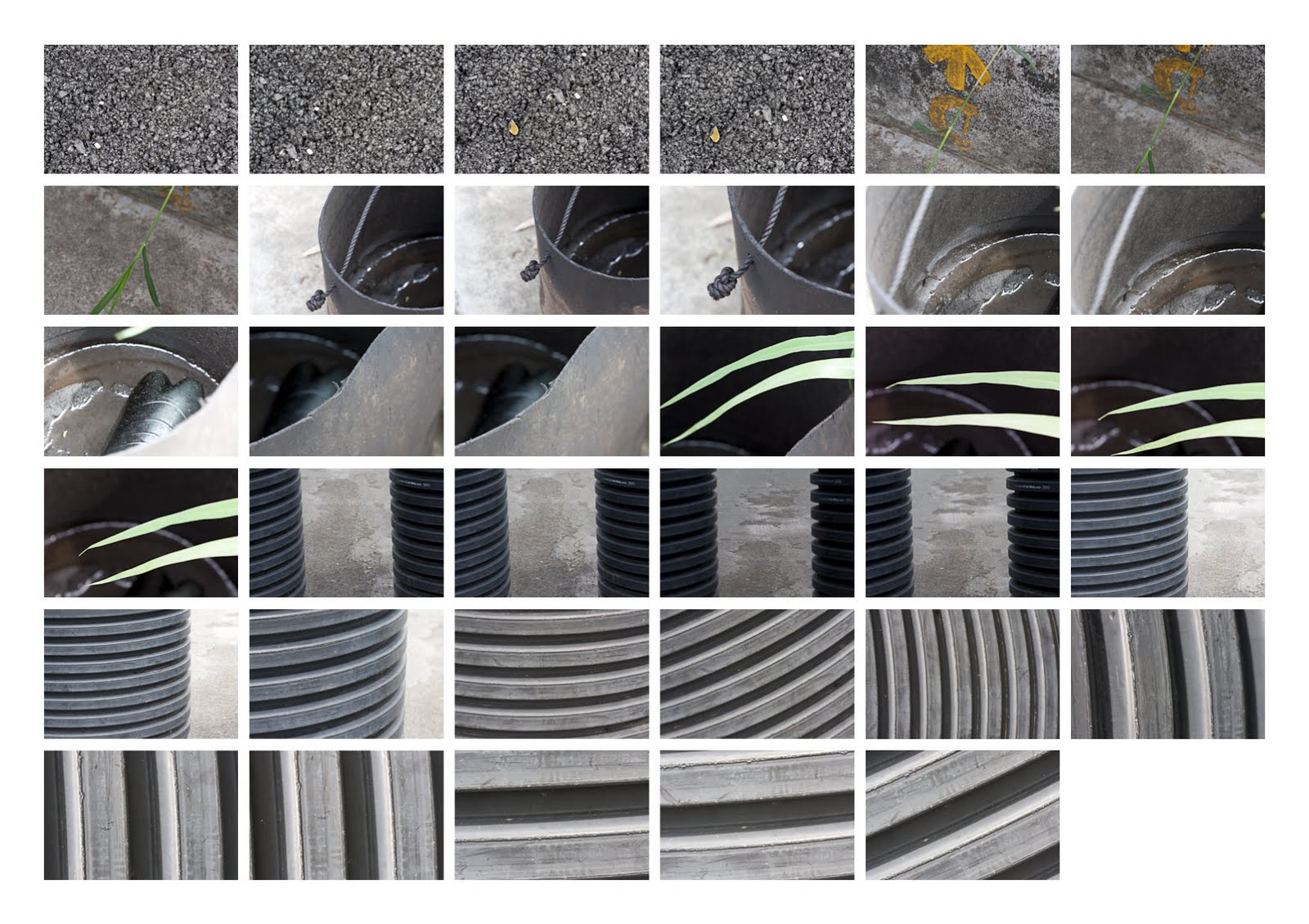
SoFoBoMo 2010: contacts part 1
As promised, contact sheets of my raw images for this year's project. Click each set to see it bigger.


Sunday, 6 June 2010
On a SoFoBoMo roll
 I started my SoFoBoMo project today, going out and getting in the first batch of photos. Despite a short session, I got 287 frames to get me going. The most I've shot in one go for some time, helped enormously by my forward planning. It's also yielded probably enough to complete the project (although I'll be looking for more and better) which takes the pressure off. As I'm focussing more on the book part than the photo part, I don't need to be so choosy about completing a story or ultimate image quality.
I thought it would be worth sharing, for those new or struggling with this, the forward planning I did that helped make this first photo expedition easy:
1. Selecting a suitable subject. My book title "LineCurveTexture" is an easy way to encompass numerous forms of abstract image which makes getting the 35 relatively easy. that was important for me this year as I want more time for the book design. In the past, I've focussed more on story and kept the book simple.
2. Selecting a suitable location. Given the subject and way I'd be shooting, I had a good location in mind - in the modern vernacular a target rich environment. There are also 2 other ready locations I can use to gather more.
3. Selecting suitable equipment. In this case I'm hand-holding my 100mm macro lens.Abstract images using a macro lens means from a relatively small area I can gather a large number of different images. I only have to move a few inches in any direction to get whole new views.
Bringing all three of these together - subject, location, equipment - makes the photography part relatively easy. And I put some though into making it so.
Whatever your goal is, putting some thought into these three aspects, keeping it quite simple and choosing them to work together will greatly improve the success rate for gathering up enough photos.
As has been done in the past, I'll be posting my out of camera images as contact sheets so you can see the process as it happens.
Tuesday, 1 June 2010
Under starter's orders, they're off

The official announcement has gone up for the start of SoFoBoMo 2010. The start time is 00:01 on 1st June wherever you are - local time to give everyone an equal chance. Of course, you don't need to start right away just so long as you finish by the end of July.
If you've not already registered, why not?
Monday, 31 May 2010
24 hours to go

Just 24h until SofoBoMo 2010 officially starts. Expect an official announcement on the SoFoBoMo website when it happens.
Of course you can start any time in the 2 month window, as long as you're finished and submit your entry by the end of 31st July. If you want to get full advantage of the 31 day window, don't start any later than 1st July.
For my part, I'll be starting next Sunday 6th June, I expect. That gets me in early and gives me chance to get in a second book if the opportunity arises (although I'm not expecting it to do so).
Sunday, 23 May 2010
Picking a project
Normally I've got a bunch of project ideas and I already have several long-term projects on the go but this year I've been struggling for ideas for SoFoBoMo. Finally I've hit on a good idea that will be easy to photograph so that I can focus on the book making bit. It also should mean I can avoid too much time outside as right now the weather is far too hot to be wandering around for hours.
I'm not going to reveal the project details just yet - I'll save that for when I get started. Looks like just the one submission this year, too (compared to the 2 in 2008 and 4 last year, that makes it seem like I'm slacking).
Saturday, 24 April 2010
SoFoBoMo: don't forget to pledge
If you've signed up for SoFoBoMo, either new this year or in previous years, then you'll need to pledge to get yourself in the list and add to the number on the home page. To pledge; log-in to SoFoBoMo, go to "Your Account", hit the pledge link.
There's a good reason for this 2-step process. It means people need to pledge each year, which also means if you sign up one year and don't want to take part the next, that's also OK. We'll only count those that tell us they want to participate by pledging.
Friday, 26 March 2010
New SoFoBoMo site is live
After quite some effort behind the scenes, the new Solo Photo Book Month (SoFoBoMo) website is live. Still some design tweaking going on and quite a lot of content to develop (hopefully with your help). New design, new logo, lots of new features added and planned.
Go check it out, go register, get involved.
Past participants are already in the system, you just need to go through a simple password reset process to get your account active on the new system.
Thursday, 30 July 2009
SoFoBoMo 2010: learning materials
If you're interested, or participated, in Solo Photo Book Month, then you've probably seen Paul Butzi's announcement about next year's event. And you've maybe seen Colin Jago's call for help with translations.
Another feature for the website that we are planning is learning material to help SoFoBoMoers with various aspects of planning, preparing and completing their photobook. The aim is to have two main parts to this: first a community supported Wiki with lots of useful info on relevant topics, presented in a way useful for the event and second downloadable instructions for various tasks, especially around using appropriate software for making the book. I'll be leading the charge on this front.
Topics that will definitely get covered:
image formats, pdf in general, pdf creation, colour management, book making software (Scribus, Pages, InDesign), layout principles.
But this post is also a call for help on two fronts:
If there are other topics you want covered, drop a comment here which gets published and I'll gather them all up and try and include them in the plan. Was there stuff you wish you'd known in advance? Stuff you still don't know but wish you did?
On the other hand I'm looking for volunteers to help put together material for the site. Got useful tips? Instructions on particular software? Want to help testing the instructions? Found some useful resources that got you through SoFoBoMo? Drop a comment (won't get published) with contact details and I'll get in touch with how you can help. No submissions just yet, just volunteers.
In due course there will be a community editable wiki etc on the website but for now we need to gather initial material to populate it once it's running. And we'll be encouraging translation of that stuff, too.

 Posts
Posts


